Tropical Storm Digital Color Palette: A Designer's Moody Toolkit
There’s a certain mood that strikes when you’re working on a project that needs depth without being loud. It’s the feeling of a late afternoon storm rolling in over the ocean—powerful, serene, and full of complex shadows. That’s exactly the energy captured in the Tropical Storm Digital Color Palette. This isn’t just a random collection of swatches; it’s a curated mood board in a file, designed to bring a sophisticated, grounded, and slightly dramatic atmosphere to your digital work.
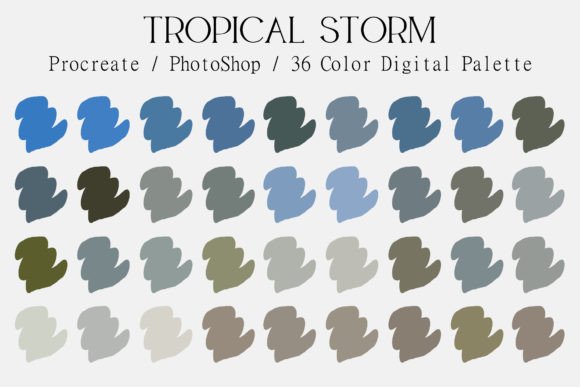
This handpicked collection blends rich, deep blues with the muted calm of grey-blue tones. It introduces earthy, organic olive greens and anchors everything with medium-toned, warm browns. The result is a palette that feels both natural and refined. It’s perfect for projects that need to convey stability, creativity, and a touch of moody elegance. Whether you’re designing a brand identity, crafting social media graphics, or building a website, this palette provides a cohesive and professional starting point.
Where This Palette Truly Shines
Understanding where a color palette works best is key to using it effectively. The Tropical Storm Digital Color Palette excels in environments where atmosphere and readability are equally important. Think of it as your go-to for creating a strong visual hierarchy without relying on harsh contrasts.
For brand identity and logo design, these colors communicate trust, depth, and a connection to the natural world. A wellness brand, a boutique coffee roaster, a sustainable fashion label, or a creative agency could build an entire visual language around these tones. The olive greens and browns add an organic, authentic feel, while the blues provide a stable, trustworthy foundation.
In editorial design and publishing, the palette is a dream. Imagine a magazine layout, a blog header, or an e-book cover using these tones. The medium browns and grey-blues are fantastic for body text and secondary elements, offering excellent readability against lighter backgrounds. The richer blues can be used for pull quotes, headings, or accent graphics to draw the eye.
Digital applications are where the palette becomes incredibly versatile. For web design, use the darker blues for navigation bars and footers, the olive greens for call-to-action buttons, and the browns for text. This creates a site that’s easy to navigate and pleasing to the eye. For social media graphics, the cohesive nature of the palette ensures your Instagram grid or Pinterest boards look intentionally curated, not chaotic. It’s also perfect for packaging design, especially for products that want to emphasize natural ingredients, craftsmanship, or a premium, earthy aesthetic.
Practical Guidance for Using Your New Palette
Getting the most out of any design asset means knowing how to integrate it into your workflow. The Tropical Storm Digital Color Palette comes with both a JPG for quick reference and an ACO file for seamless software integration, making it a true premium font companion for your color needs.
Adding to Your Software:
- For Procreate: Simply go to your Color Panel, tap the Palettes tab, hit the + symbol, and choose "New from File." Navigate to your downloads and select the ACO file. Your new palette will be ready to use.
- For Adobe Photoshop (and other Adobe Programs): You have two easy options. The first is through Edit > Presets > Preset Manager. Change the Preset Type to Swatches and click "Load" to find your ACO file. Alternatively, open the Swatches window (Window > Swatches), click the menu icon in the top right corner, and select "Import Swatches" or "Load Swatches."
- For Clip Studio Paint: Open the Window menu and select Color Set. Click the three-line menu in the top left of that panel and choose "Import color set…" to load your ACO file.
Evaluating Fit and Pairings: Before committing, test the palette against your project’s core message. Does the mood align? Pull the primary blue and a brown into a mockup with your chosen typeface. The Tropical Storm Digital Color Palette pairs beautifully with clean sans serif fonts for a modern look, or with elegant serif fonts for a more traditional, editorial feel. For a touch of personality, a subtle script font or handwritten font in one of the olive or brown tones can work well for accents.
Readability and Hierarchy: Use the darker blues and the medium brown for primary text where high contrast is needed. The grey-blues are excellent for secondary information, subtitles, or UI elements that shouldn’t compete for attention. The olive green, while vibrant, works best as an accent color for highlights, links, or key graphics to guide the viewer’s eye through your layout.
This collection is more than just a color scheme; it’s a foundation for building a recognizable and professional brand identity