Gradient Color Alphabet Sublimation: Beyond Basic Typography
If you have spent any time in the digital design space recently, you know that static, flat text often fails to grab attention in a crowded market. We are constantly searching for design assets that provide that "wow" factor without requiring hours of manual editing in Photoshop. This is where the Gradient Color Alphabet Sublimation set enters the conversation. It is not just a font in the traditional sense; it is a complete visual toolkit designed to inject energy, modernity, and color directly into your projects.
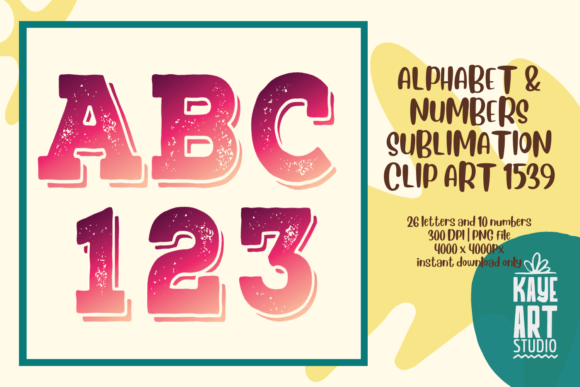
Unlike a standard vector typeface where you simply type a letter and change the color, these assets come as high-resolution raster images. Specifically, you receive 26 letters (A-Z) and 10 numbers (0-9). The defining characteristic here is the gradient effect. We are talking about smooth, professional color transitions that blend hues in ways that are difficult to achieve manually, especially on complex letter shapes. The visual personality of this collection is undeniably modern, energetic, and playful. It fits perfectly within the current trend of bold, vibrant aesthetics that dominate social media feeds and contemporary packaging designs.
The Technical Foundation: Why Quality Matters
When working with pre-rendered typography, resolution is the make-or-break factor. There is nothing worse than finding a beautiful letter set only to have it pixelate the moment you try to scale it for a poster or a t-shirt. This particular Gradient Color Alphabet Sublimation set addresses that concern head-on. The files are provided at a massive 4000 x 4000 pixels with a quality of 300 DPI.
To put that into perspective for those less familiar with print specifications, 300 DPI is the industry standard for high-quality printing. At 4000 pixels wide, these letters are substantial enough for large-format printing, such as party backdrops or signage, while remaining crisp enough for small items like stickers or business cards. Furthermore, the files are delivered as PNG with a transparent background. This is crucial for layering. You do not have to worry about awkward white boxes sitting behind your letters when you place them over photos or textured backgrounds. The transparency allows the gradient letters to blend seamlessly into any composition.
It is important to note that these are raster images, not SVG cut files. This distinction matters depending on your workflow. For digital design, web graphics, and sublimation printing, PNGs are the gold standard. However, if you are looking to use a laser cutter that requires vector paths to trace, you would need to vectorize these images separately. For the vast majority of users—scrapbookers, digital marketers, and print-on-demand creators—the PNG format is exactly what is needed for a smooth, high-quality output.
Real-World Applications: From Branding to Personal Projects
The versatility of the Gradient Color Alphabet Sublimation set makes it a valuable asset across a wide range of industries. It is not limited to one specific niche; rather, it serves as a bridge between professional commercial work and personal creative hobbies.
Elevating Commercial and Marketing Materials
For entrepreneurs and marketers, brand identity is everything. If you are launching a youth-oriented brand, a tech startup, or a lifestyle product, you need typography that speaks the language of innovation. These gradient letters work exceptionally well for logo design concepts, particularly for brands that want to appear dynamic and forward-thinking. Instead of a static sans serif font, using a gradient letter for a monogram or an initial can instantly set a brand apart.
In social media graphics, attention spans are short. You have milliseconds to stop a user from scrolling. Large, colorful gradient headers on Instagram stories or Pinterest pins can drastically improve engagement. Because the files are high-resolution, they look professional even on high-definition mobile screens. This is also a fantastic resource for packaging design. Imagine a product line where the initials or key descriptors utilize these vibrant gradients to pop off the shelf. It communicates a sense of fun and modernity that appeals to a younger demographic.
Digital Publishing and Print on Demand
If you are involved in KDP covers or journal design, you understand the struggle of finding assets that are unique enough to pass copyright checks but professional enough to sell. The Gradient Color Alphabet Sublimation files are perfect for creating eye-catching titles on planners, notebooks, and coloring books. Because you have the full alphabet and numbers, you can spell out specific titles like "2024 Planner" or "Travel Journal" without needing to buy a full commercial font license that might restrict usage.
For the sublimation projects community, this asset is a game-changer. Sublimation relies on transferring ink onto materials like fabric, ceramic, or metal. Gradient designs are notoriously popular in the sublimation market—think of those vibrant tumblers, all-over print t-shirts, or colorful mugs. Having a pre-made set of gradient letters allows you to quickly create custom names or phrases for personalized gifts or Etsy listings without spending hours creating clipping masks in design software.
Scrapbooking and Stationery
On the personal side, scrapbooking and photo albums benefit greatly from the transparency and color variety of these files. You can overlay the letters onto photos to create dates, names, or captions that don't obscure the image but rather complement it. For invitations and stationery, such as birthday party invites or graduation announcements, the gradient style adds a celebratory, festive vibe that standard black text simply cannot achieve.
Design Strategy: How to Use Gradient Typography Effectively
While the Gradient Color Alphabet Sublimation set is visually striking, using it effectively requires a bit of design strategy. You cannot simply throw gradient text onto a busy background and expect it to be legible. Here is how to maximize the impact of these assets.
Readability and Visual Hierarchy
Gradients draw the eye. This makes them excellent for visual hierarchy. Use these letters for headlines, monograms, or single words that need to stand out. Avoid using them for long paragraphs of body text. The changing colors can make extended reading difficult and tiring for the eyes. Instead, pair the gradient alphabet with a clean, simple sans serif font or a readable serif font for your body copy. This contrast creates a professional balance: the gradient provides the flair, and the standard font provides the readability.
Background and Contrast
Because these are PNG files with transparent backgrounds, you have control over the canvas. However, contrast is key. If your gradient letters feature light colors (like yellow fading into light green), placing them on a white background will render them invisible. Conversely, dark gradients on a black background will vanish.
A practical tip is to use a solid, neutral background—such as dark charcoal, white, or soft grey—to let the colors pop. Alternatively, if you are placing them over a photo, look for areas of low detail or use a "knockout" effect where you place a semi-transparent shape behind the text to ensure the letters remain the focal point.
Color Harmony
Since the colors are baked into the letters, you need to ensure the rest of your design harmonizes with them. Look at the dominant colors in the gradient. If you are using a "Sunset" gradient (orange to pink), pull those accent colors into other elements of your design, such as borders, icons, or background textures. This creates a cohesive brand identity rather than a disjointed collage of random assets.
Evaluating Fit and Workflow Integration
Before purchasing or downloading any design asset, it is wise to evaluate how it fits into your current workflow. The Gradient Color Alphabet Sublimation set is a premium font alternative, meaning it acts as a high-end design element rather than a standard typing tool.
- Software Compatibility: Since these are PNG files, they are universal. You can use them in Adobe Photoshop, Illustrator, Canva, Procreate, Affinity Photo, or even Microsoft Word. There is no installation required; you simply drag and drop the letters you need.
- Assembly Required: Unlike a typed font where you press "A" and "B" and they automatically align, using an alphabet set requires manual kerning (spacing). You will need to place each letter individually and adjust the spacing to look natural. This takes slightly more time but offers total creative control over the layout.
- Commercial Licensing: Always review the specific license of the file you purchase. Most digital assets for this type of use allow for commercial use in physical end products (like a t-shirt you sell) or digital end products (like a flattened JPG invitation). However, you typically cannot resell the raw source files (the PNGs themselves) to other designers.
Ultimately, the value of the Gradient Color Alphabet Sublimation set lies in its ability to instantly elevate a project. It bridges the gap between complex graphic design and accessible crafting. Whether you are a small business owner looking to spice up your packaging, a blogger creating a new header, or a crafter designing a one-of-a-kind gift, these high-resolution, vibrant letters provide a professional solution that captures the essence of modern typography and visual appeal.